
AI PROMPT ·
GTA 6 海滩别墅 MCP 工作流
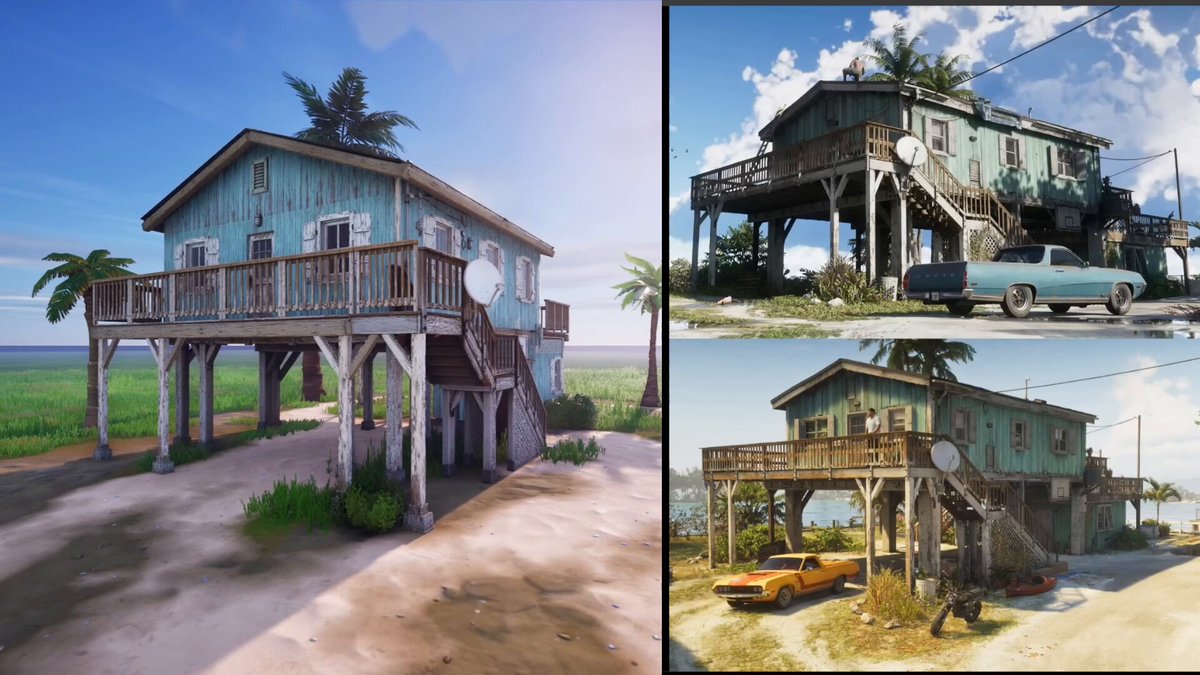
GPT-6 使用 MCP 工具制作了 GTA 6 的海滩别墅! 仅通过 Blender MCP 运行 Astra 对我来说行不通,因为它主要使用原始形状来构建资产。 现在,结合 @Atlas3DAI 工作流和 Tripo,情况发生了变化! 起初,我认为 Tripo P2 是最佳选择:将低多边形结果直接导入 Blender。我尝试了,但没有得到想要的效果。别误会,P2 很棒,相比 P1 有了巨大改进,我只是希望在这个项目中获得更丰富的细节。因此,我最终使用了 Tripo 3.1。 首先,我需要一个良好的起点。我给 Astra 提供了一些概念艺术图和 YouTube 链接,它生成了很好的参考图像供后续使用。 借助 Atlas 工作流,我利用这些参考图生成了各个独立部件的图像。使用 Atlas MCP,我将它们导出,并根据提示词自动重命名所有文件。下一步是将图像输入 Atlas Batch Composer,以便一次性运行所有 3D 生成任务。 我要求 Astra 根据资产的形态和大小,将其优化为 5K 或 1K 三角形。经过几次测试,Astra 的处理速度越来越快。我将全部 70 个高多边形资产交给它处理。 随后,Astra 负责了整个构建过程。它将优化后的资产导入 Blender,并利用参考图像开始重建房屋。我只需给出两次方向性反馈,并手动调整了几处缩放比例。 不过,仍有大量部件需要处理。每根横梁都是一个独立的对象,我知道如果我想将房屋导出到 UEFN 或 Unreal Engine,这并不理想。 于是,我让 Astra 只导出独特的资产。然后,利用 UEFN MCP,它在复用横梁和窗户等模块化部件的同时,以 1:1 的比例重建了所有内容。 看着它在 UEFN 中放置所有组件真的很有趣,就像观看房屋建造过程的延时摄影一样!
PROMPT
GPT-6 made GTA 6 beach house using MCP tools! Running Astra only through Blender MCP didn’t work for me, since it was mainly using primitive shapes to build the assets. Now, with @Atlas3DAI workflows and Tripo, that changed! Initially, I thought Tripo P2 would be the way to go: low-poly results straight into Blender. I tried it, but I didn’t get the results I wanted. Don’t get me wrong, P2 is great and a big improvement over P1, I just wanted more detail for this project. So I ended up using Tripo 3.1. First, I needed a good starting point. I gave Astra some concept art and YouTube links, and it generated great reference images to work with. With Atlas workflows, I used those references to generate images for all the individual parts. Using Atlas MCP, I exported them and automatically renamed everything based on the prompts. The next step was feeding the images into Atlas Batch Composer so it could run all the 3D generations in one go. I asked Astra to optimize the generated assets to either 5K or 1K triangles, depending on their form and size. After a few tests, Astra made the process faster and faster. I gave it all 70 high-poly assets and let it run. Astra then took care of the whole build. It imported the optimized assets into Blender and used the reference images to start recreating the house. I only had to give it directional feedback twice and manually rescale a few things. There were still a lot of parts, though. Each beam was a separate object, and I knew that wasn’t ideal if I wanted to export the house to UEFN or Unreal Engine. So I asked Astra to export only the unique assets. Then, using UEFN MCP, it rebuilt everything 1:1 while reusing modular parts like beams and windows. I really enjoyed watching it place all the pieces in UEFN, almost like watching a timelapse of the house being built!