
AI PROMPT ·
利用 Codex Mockups 优化 Web 设计工作流
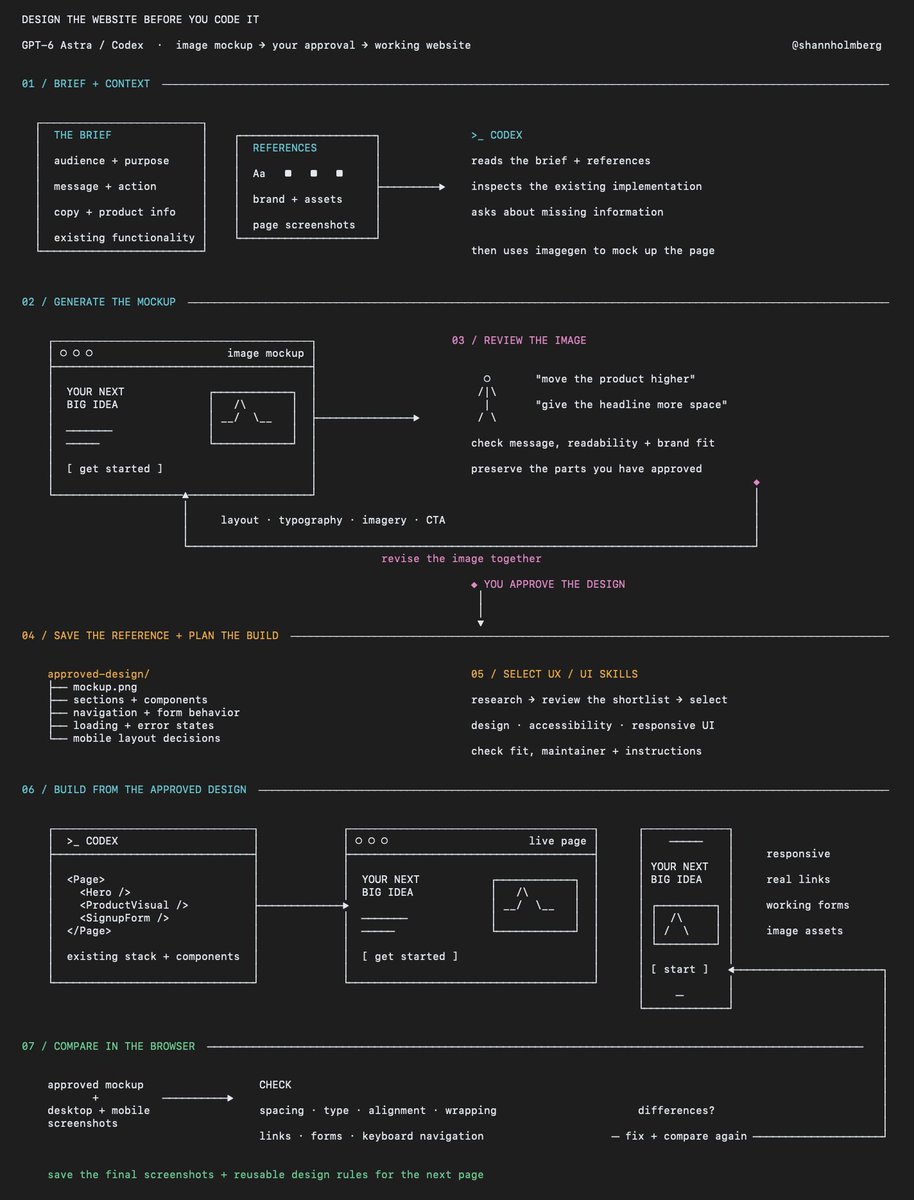
如何提升 GPT-6 Astra / Codex 设计和编写网站代码的能力 自 GPT Image 发布以来,我一直在使用这种方法,并且随着 GPT-2 和 GPT-2.5 的推出,效果持续改善。 核心思路是让 Codex 在构建网站之前先生成可视化的原型(Mockups),无论是重新构想现有页面还是从零开始构思新想法。 你可以在它开始编写前端代码之前审查布局、提供反馈并确认设计方案。 以下是具体使用方法: 1. 向 Codex 提供创意和背景信息 说明网站的目标受众、需要传达的信息以及希望访问者采取的行动。 包含你已有的素材: > 页面文案和产品信息 > 品牌指南、字体、颜色和资产文件 > 如果是重新设计,请提供现有页面的截图 > 参考案例及你对每个案例喜欢之处的备注 让它在生成原型前先询问缺失的信息。 对于现有网站,要求它检查当前的实现方式,包括需要保留的组件和功能。 2. 要求先生成设计 明确指出你需要一个图像原型供审查,然后再进行实施。 起始提示词示例: > 使用 imagegen 根据此简报和附件中的参考资料创建网站原型 > 使用提供的文案、品牌资产和产品信息 > 展示页面布局、排版、图像和行动号召(CTA),并在编写代码前等待我的反馈 如果你仍在探索阶段,可以请求不同的视觉方向,每个版本应在布局或图像使用等方面做出有意义的改变。 3. 共同完善原型 将其视为用户需要理解和使用的页面进行审查。 > 主要信息是否清晰? > 布局是否引导注意力指向预期操作? > 文本是否易读? > 设计是否符合你的品牌形象? > 是否有应删除的通用板块或虚构细节? 针对图像提供具体反馈,例如增加标题周围的留白、减少装饰元素或将产品示例移至页面上方。 要求它在保留已批准部分的同时修改选定的原型。 4. 将批准的原型转化为构建计划 让 Codex 识别实施设计所需的板块、可复用组件和资产。 确定用户交互时的行为,包括导航、表单、按钮以及加载或错误状态。 同时定义布局如何在移动端适配,因为桌面端原型未涵盖这些决策。 将批准的图像和你的决策保存到项目(board)中,以便 Codex 在构建过程中参考。 5. 在构建前寻找相关的 UX / UI 技能(skills) 你可以在技能目录和 X 上的推荐中找到这些资源,UI Skills 是一个值得探索的例子。 将项目简报提供给 Grok Bot,让它研究哪些技能在你的技术栈中流行且值得考虑。 要求它检查每个技能的功能、维护者以及其指令是否适合你正在构建的网站。 这可能包括以下方面的技能: > 前端设计和组件模式 > 无障碍性和响应式布局 > 动画和交互设计 > 审查完成的 UI 审查候选列表,然后在实施前将选定的技能连同你的设计系统和批准的原型一起提供给 Codex。 6. 基于该参考构建页面 要求 Codex 使用项目现有的技术栈和组件来实现批准的设计。 保持标题、按钮和表单作为可用的网站元素,并将插图和其他生成的视觉效果保存为独立的资产。 有用的实施提示词: > 使用项目现有的技术栈和组件实现批准的设计 > 确保标题、按钮和表单功能正常,将插图等视觉元素作为独立资产处理
PROMPT
how to improve GPT-6 Astra / Codex's ability to design and code websites I've been using this approach since GPT Image was released, and the results have kept improving with 2 and 2.5 the idea is to have Codex generate visual mockups of the website before building it, whether you're reimagining an existing page or starting with an idea from scratch you can review the layout, give feedback and agree on the design before it starts writing the frontend here's how to use it: 1. give Codex the idea and your context explain who the website is for, what it needs to communicate and what you want someone to do when they visit include the material you already have: > your page copy and product information
> brand guidelines, fonts, colors and assets
> screenshots of the existing page if you're redesigning
> references with notes on what you like about each one have it ask about anything missing before generating the mockup for an existing website, ask it to inspect the current implementation too, including components and functionality that need to stay 2. ask it to generate the design first be explicit that you want an image mockup to review before implementation a starting prompt: > use imagegen to create a website mockup from this brief and the attached references
> use the supplied copy, brand assets and product information
> show the page layout, typography, imagery and calls to action, and wait for my feedback before writing code you can request different visual directions if you're still exploring, with each version changing something meaningful like the layout or use of imagery 3. work through the mockup together review it as a page someone needs to understand and use > is the main message clear?
> does the layout guide attention toward the intended action?
> is the text readable?
> does the design fit your brand?
> are there generic sections or invented details that should be removed? give specific feedback on the image, such as increasing the space around the headline, reducing decorative elements or moving the product example higher on the page ask it to revise the chosen mockup while preserving the parts you've approved 4. turn the approved mockup into a build plan have Codex identify the sections, reusable components and assets needed to implement the design agree on what happens when someone interacts with it, including navigation, forms, buttons and any loading or error states also define how the layout should adapt to mobile, because a desktop mockup leaves those decisions open save the approved image and your decisions in the project so Codex can refer to them during the build 5. find relevant UX / UI skills before building you can find these in skill directories and through recommendations on X, UI Skills is one example to explore give your Grok Bot the project brief and have it research which skills are popular and worth considering for your stack ask it to check what each skill does, who maintains it and whether its instructions fit the website you're building that could include skills for: > frontend design and component patterns
> accessibility and responsive layouts
> animation and interaction design
> reviewing the finished UI review the shortlist, then give Codex the selected skills alongside your design system and approved mockup before implementation 6. build the page from that reference ask Codex to implement the approved design using your project's existing stack and components where appropriate keep headings, buttons and forms as working website elements, with illustrations and other generated visuals saved as separate assets a useful implementation prompt: > build the approved mockup as a responsive page
> preserve its layout, spacing, typography and visual hierarchy, use the approved copy and implement the interactions we agreed
> flag anything that needs a design decision before changing it 7. compare the rendered website with the mockup have Codex open the implemented page in a browser and capture screenshots at desktop and mobile sizes compare those screenshots with the approved design and work through the differences check spacing, font sizes, image proportions, alignment and text wrapping, then test the links, forms and keyboard navigation after you've reviewed the page, save the final screenshots and reusable design rules with the project for the next page you build