
AI PROMPT ·
Cinematic Wizard Workshop 3D 工作流
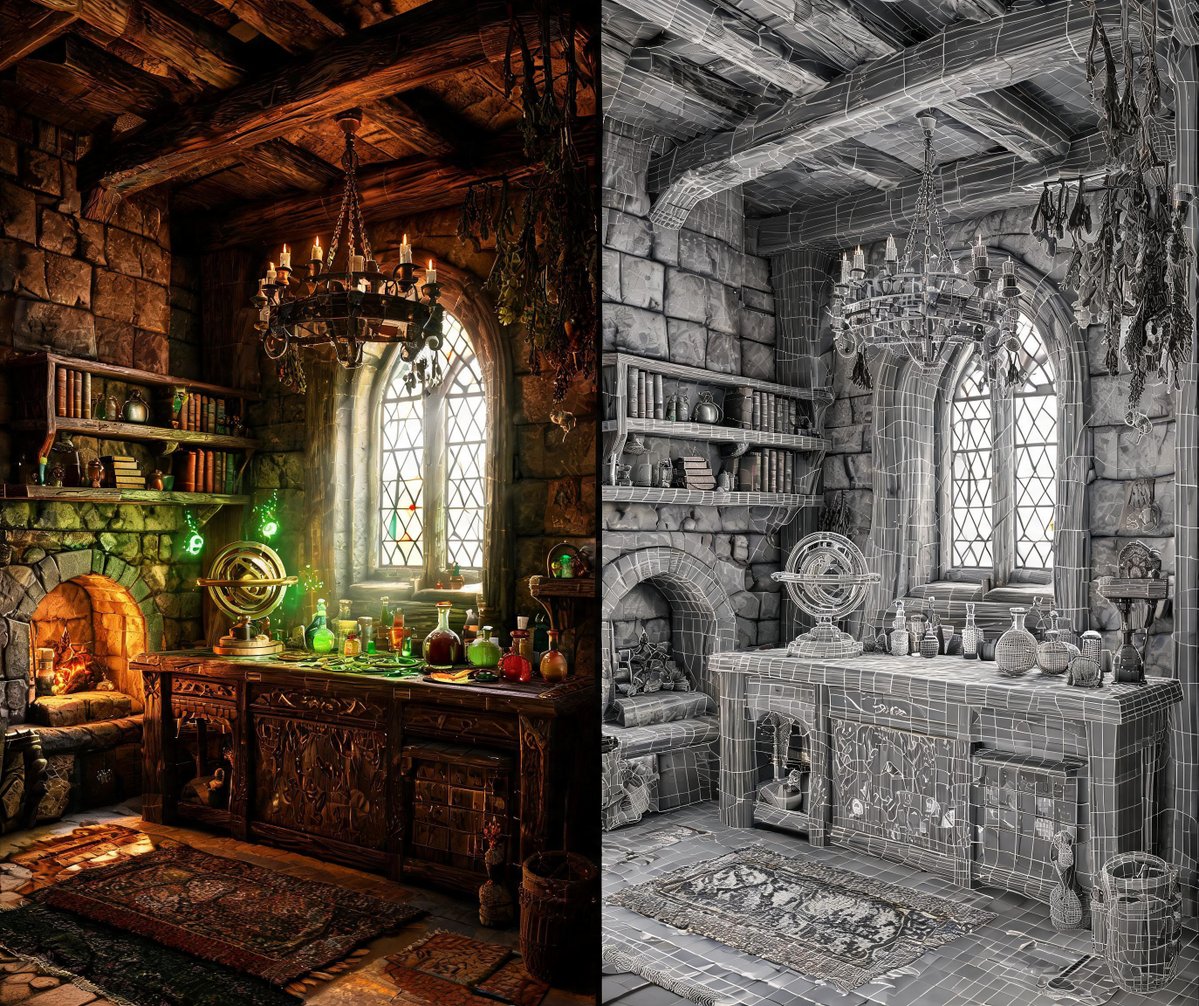
在 Blender 中基于附带的参考图创建一个 12 秒的单镜头白模动画,然后使用 PixVerse 配合 Seedance 2.5 将导出的动画转换为电影级的 {argument name="style" default="巫师 3 风格"} {argument name="scene" default="巫师工作室"} 序列。在 Blender 中,利用参考图指导房间布局、建筑、家具和道具的制作。构建一个可编辑的低多边形场景,确保网格和 UV 清晰,并使用简单的白色或浅灰色材质。场景应包含石墙、木架、拱形窗、壁炉、书籍、天文仪器以及摆满药水瓶的炼金桌。保持轮廓清晰,房间比例真实可信。制作一个低视角的第一人称动画,画面中仅出现一只右手,手持一个 {argument name="item" default="药水瓶"}。开始时,瓶子放置在右下边缘附近,角色环顾工作室并看向窗户。自然地举起药水,停顿以观察它,将焦点转移到瓶子上,然后放下它,同时转向壁炉和发光的试剂。手掌与瓶子之间留出微小间隙,同时保持逼真的指尖接触。运用平滑的速度变化、柔和的弧形头部运动、细微的呼吸感以及轻微的手臂滞后感。以正常播放速度检查完整动作,确保没有穿模、抓握不自然、转动突兀或过度抖动。保持 Blender 壁炉的简洁:使用原木、低亮度余烬和闪烁的光线。避免使用实心圆锥体或火焰形状的网格,以免被误认为是发光的岩石。根据参考图准备一个独立的壁炉细节,以指导最终外观。导出完整的白模 MP4。随后使用 PixVerse 生成 12 秒视频,明确将 Blender 导出的白模视频作为摄像机、动作和空间参考,将附带图片作为场景外观参考,将壁炉细节作为火焰参考。保持连续镜头、低视角、单手持药水动作、房间布局和节奏的一致性。通过风化的石头、雕刻的木材、磨损的皮革、铁制配件和逼真的玻璃来丰富场景。将凉爽的窗光和漂浮的尘埃与温暖的壁炉照明以及柔和发光的魔法液体相结合。创造自然的木火,让细长且不规则的火焰在焦黑的木头间卷曲,伴随发光的余烬、偶尔的火星和细微的烟雾。确保手部解剖结构、瓶子形状、火焰运动和焦点过渡在整个过程中保持一致。检查生成的完整视频,特别是手部动作和壁炉效果。交付白模 MP4、PixVerse 渲染的 MP4 以及可编辑的 Blender 项目文件。验收后,保留最新批准的版本,并将旧版本移至可恢复存储空间。
PROMPT
Create a 12-second, single-take white-model animation in Blender based on the attached reference image, then use PixVerse with Seedance 2.5 to transform the exported animation into a cinematic, {argument name="style" default="Witcher-3-inspired"} {argument name="scene" default="wizard workshop"} sequence. In Blender, use the reference image to guide the room layout, architecture, furniture, and props. Build an editable low-poly scene with clean meshes and UVs, using simple white or light-gray materials. Include stone walls, wooden shelves, an arched window, a fireplace, books, an astronomical instrument, and an alchemy table filled with potion bottles. Keep the silhouettes readable and the room proportions believable. Animate a low first-person viewpoint with exactly one right hand holding one {argument name="item" default="potion"}. Begin with the bottle resting near the lower-right edge while the character looks around the workshop and toward the window. Raise the potion naturally, pause to examine it, shift focus onto the bottle, then lower it while turning toward the fireplace and glowing reagents. Leave a small gap between the palm and bottle while maintaining believable fingertip contact. Use smooth changes in speed, gentle curved head movements, subtle breathing, and slight arm lag. Check the complete action at normal playback for clipping, awkward grip, abrupt turns, and excessive shaking. Keep the Blender fireplace simple: use logs, low embers, and flickering light. Avoid solid cones or flame-shaped meshes, which can be interpreted as glowing rocks. Prepare a separate fireplace detail from the reference image to guide the final appearance. Export the complete white-model MP4. Then generate a 12-second video with PixVerse, explicitly referencing the Blender-exported white-model video as the camera, action, and spatial reference, the attached image as the scene appearance reference, and the fireplace detail as the fire reference. Preserve the continuous shot, low viewpoint, single-hand potion action, room layout, and timing. Enrich the scene with weathered stone, carved wood, worn leather, iron fittings, and realistic glass. Combine cool window light and drifting dust with warm fireplace illumination and softly glowing magical liquids. Create natural wood fire with thin, irregular flames curling between charred logs, glowing embers, occasional sparks, and subtle smoke. Keep the hand anatomy, bottle shape, fire movement, and focus transitions consistent throughout. Review the full generated video, especially the hand action and fireplace. Deliver the white-model MP4, the PixVerse-rendered MP4, and the editable Blender project. After acceptance, retain the latest approved versions and move older versions to recoverable storage.