
AI PROMPT · 355
弹珠计算机动画
构建一个独立的 HTML 文件:一个 3D 弹珠计算机,灵感来自 Wintergatan 的弹珠机和 Digi-Comp II,仅利用弹珠穿过机械切换器下落的过程来对两个 4 位数字进行加法运算。 硬性规则: 1. 单个 HTML 文件。通过 import map 从 引入 Three.js 及其 OrbitControls 插件。不使用其他库、物理引擎或外部资源。 2. 机制即计算机。结果的每一位都存储在一个双态切换器(触发器)中,弹珠经过时物理地翻转它。进位的发生是因为离开一个切换器的弹珠会滚入下一个切换器。任何地方都不要用 JavaScript 算术计算答案。显示的结果必须在最后一颗弹珠停止后,从切换器的状态中读取。 3. 弹珠沿轨道移动,具有可信的重力和时间节奏。没有任何瞬移现象。你可以沿路径脚本化运动,但每次切换器的翻转都必须由到达该处的弹珠引起。 4. 输入:两行各四个开关(A 和 B,范围 0 到 15),通过点击设置。一个标有 RUN 的杠杆释放弹珠。一个计数器显示已落下的弹珠数量。 5. 输出:一行五个结果切换器,最高有效位在左侧,以及一个读数显示从这些切换器读取的二进制和十进制值。 6. DEMO 按钮依次运行 5+6、9+7 和 15+15,并在每次运行之间重置,以便可以在不触碰任何内容的情况下进行屏幕录制。 7. 外观:木质项目、黄铜切换器、玻璃弹珠、温暖的演播室灯光、柔和阴影,以及跟随机器最繁忙部分的缓慢摄像机。它在 1080x1080 的正方形录制画面中应看起来美观。 8. 当切换器翻转时,通过 Web Audio API 播放短促的点击声,仅在首次用户点击后启动。 9. 它必须在普通笔记本电脑上以 60 fps 运行,且没有控制台错误。 仅输出完整的 HTML 文件。
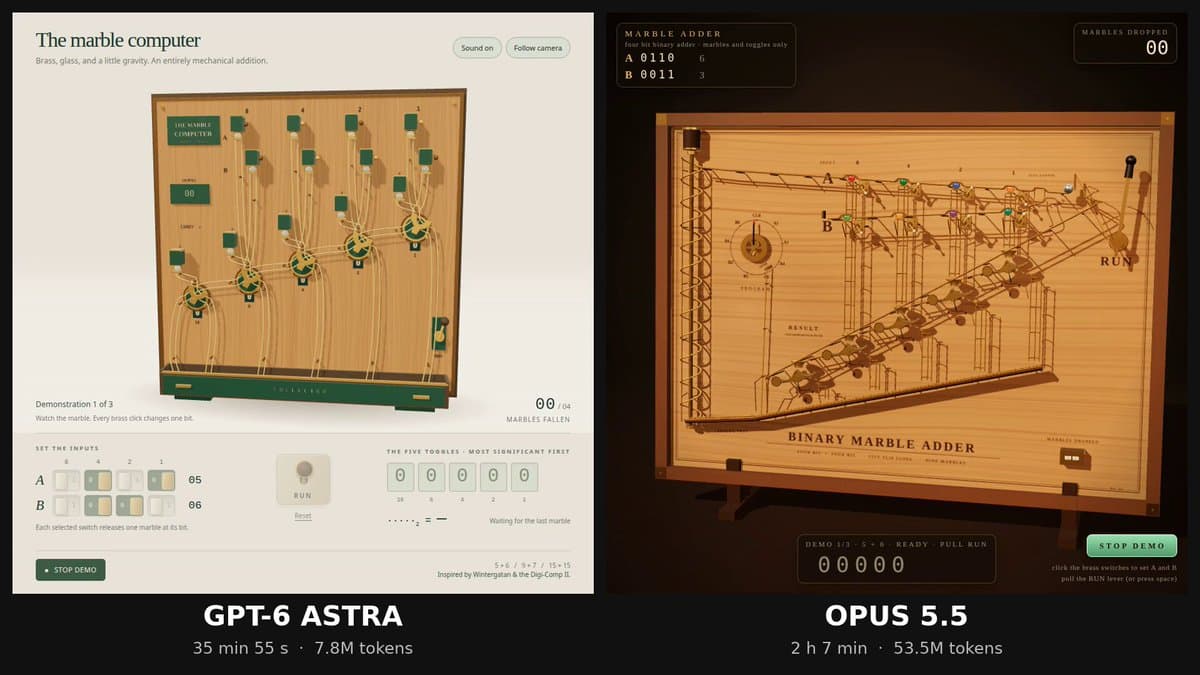
VIDEO PREVIEW
视频预览
PROMPT
Build a single self-contained HTML file: a 3D marble computer, in the spirit of Wintergatan's marble machine and the Digi-Comp II, that adds two 4-bit numbers using nothing but marbles falling through mechanical toggles. Hard rules: 1. One HTML file. Three.js from via an import map, plus its OrbitControls addon. No other libraries, no physics engine, no external assets. 2. The mechanism is the computer. Each bit of the result is stored in a two-state toggle (flip-flop) that a marble physically flips as it passes. Carries happen because a marble leaving one toggle rolls on to the next. Do not compute the answer in JavaScript arithmetic anywhere. The displayed result must be read from the toggle states after the last marble stops. 3. Marbles move along tracks with believable gravity and timing. Nothing teleports. You may script motion along paths, but every toggle flip must be caused by a marble arriving at it. 4. Input: two rows of four switches (A and B, 0 to 15), set by clicking. A lever labelled RUN releases the marbles. A counter shows how many marbles have fallen. 5. Output: a row of five result toggles, most significant bit on the left, and a readout that shows the binary and decimal value read from those toggles. 6. A DEMO button runs 5+6, then 9+7, then 15+15, resetting between runs, so it can be screen-recorded without touching anything. 7. Looks: a wooden board, brass toggles, glass marbles, warm studio lighting, soft shadows, a slow camera that follows the busiest part of the machine. It should look good in a square 1080x1080 recording. 8. Short click sounds via the Web Audio API when a toggle flips, started only after the first user click. 9. It must run at 60 fps on a normal laptop and have no console errors. Output only the complete HTML file.